Apps Like Structured for Better Daily Planning in 2026
Quick comparison of apps like Structured for daily planning
Tool | Best for in 2026 | Where it wins | Key trade‑offs | Team fit | Price band |
|---|---|---|---|---|---|
Routine | Daily planning with full context (projects, CRM, meetings) | Links tasks to clients, projects, and meeting outcomes in one place | More structure than a pure planner; brief setup required to map workflows | Solo to SMB teams scaling processes | Mid |
Motion | Auto‑scheduling heavy workloads | Algorithmic calendar placement and re‑prioritization | Rigid for reflection; lighter project/CRM context | Busy operators and small teams | Premium |
Sunsama | Ritual‑based planning for detailed and thoughtful task organization | Thoughtful planning cadence; calming workload shaping | Manual pace; limited team structures | Individuals and small groups | Mid |
Reclaim.ai | Protecting focus time and habits | Policy‑based blocks that adapt to meeting load | Calendar‑first; less context across projects/clients | Calendar‑packed professionals | Mid |
Akiflow | Fast triage from many inboxes | Command‑bar speed and capture | Shallow project/CRM depth | Solo operators | Mid |
TickTick | Personal planning with habits | Lightweight tasks, lists, and routines | Not built for deep collaboration | Individuals | Low |
Todoist | Simple, reliable task lists everywhere | Ubiquitous, predictable, extensible | Scheduling relies on calendar pairing; minimal CRM/meetings | Individuals, small teams | Low–Mid |
Notion Calendar | Clean time blocking for Notion‑centric work | Ties events to Notion docs/pages | Not a full task/CRM system | Notion‑first users | Low–Mid |
Routine: the comprehensive daily planning system tailored to your professional and personal landscapes
Structured is a great start for basic time blocking, but as your “today” grows to involve clients, deals, projects, and meeting notes, you’ll need deeper context. Routine integrates daily planning, light project management, a knowledge base, CRM records, and meeting workflows in one unified dashboard, so your schedule stays relevant to real work without switching between apps.
What sets Routine apart: Your tasks are always connected, to projects, contacts, and full meeting threads. For example, “Call Sam about contract redlines” appears with the associated client, past notes, and relevant docs, no searching required. Teams benefit from shared context, reducing handoffs and status pings.
Trade‑offs: You’ll invest some time up front to map projects, client details, and recurring rituals, after which planning becomes increasingly natural. If you want pure minimalism, simpler time blockers may feel lighter.
Best for: Freelancers juggling client work, agencies with active pipelines, and revenue or ops teams who regularly collaborate across projects. Anyone whose daily choices are driven by meetings should consider Routine. Explore these practical meeting templates and recap formats for tighter loops.
Decision point: Routine becomes essential when your daily tasks are influenced by meeting discussions, project knowledge, or client follow‑ups, not just personal reminders.
If you prefer a calendar that independently schedules tasks with limited input, consider using Motion or Reclaim.ai. While these may seem faster initially, it’s important to note that they may lack in cross-project and CRM clarity.
Motion: automatic scheduling for people who don’t want to plan twice
Motion is specifically designed for those with busy schedules. By providing it with tasks, estimated effort, and deadlines, its engine smartly organizes and adjusts your schedule around your meetings to always present an updated plan.
Where Motion excels: Aggressive auto‑scheduling and constant re‑prioritization. If your main struggle is “my blocks are never up to date,” Motion does the heavy lifting for you.
Trade‑offs: Algorithmic decisions can sometimes feel mysterious, and because Motion is calendar‑focused, you may still need other tools to handle documentation, project management, or CRM needs. The calendar remains accurate even when multiple projects overlap, but contextual clarity can be lacking.
Decision point: Motion is perfect for when keeping your schedule current is more work than your actual tasks.
For planners who need project, client, or meeting context next to every block, Routine is a more integrated alternative.
Sunsama: ritual‑based planning for detailed and thoughtful task organization
Sunsama helps you turn planning into a reflective daily ritual. Bring in tasks from email, PM tools, or notes to shape a realistic, focused day, and review your week to avoid overcommitting. Many users graduate to Sunsama after Structured, valuing its calmer and more thoughtful approach.
Where Sunsama shines: Mindful limits, intentional pace, and clean integrations for bringing in work without clutter or noise.
Trade‑offs: The process is intentionally manual. If your calendar changes throughout the day, you’ll often be adjusting and moving things around. While it offers team support, it’s not designed for complex cross‑functional projects.
Choose Sunsama if you’re committed to personal focus and a humane daily pace. If you often need project or client context for tasks, Routine can offer a more contextual experience.
Reclaim.ai: calendar rules that protect your priorities from meetings
Reclaim.ai is the go-to for those with overloaded calendars. Simply set your policies, focus time, and habits, Reclaim.ai automatically creates flexible blocks that adjust as new meetings are scheduled. It’s ideal for executives and individual contributors who find their days consumed by calls.
Where Reclaim.ai excels: Allows you to protect your highest priorities automatically, without micromanagement. It’s like installing a safety net in your calendar.
Trade‑offs: Reclaim.ai puts the calendar first and doesn’t serve as a project or CRM hub. You’ll need to look elsewhere if you want task context or project history alongside your time blocks. If you wish your to-do list reflected why each item matters, another app may suit you better.
Strong alternative: If you want your focus time to naturally inherit details from projects, clients, and meetings, Routine provides a more connected planning experience.
Akiflow: fast triage for people drowning in inbound tasks
When your greatest challenge is high task volume, pings on Slack, flagged emails, endless notifications, Akiflow consolidates all channels into a single inbox and lets you manage everything quickly from your keyboard.
Where Akiflow excels: Speed and efficiency. Capture, postpone, or schedule work instantly. Ideal for efficiency-minded users and operators who love shortcuts.
Trade‑offs: Project and CRM capabilities are basic. If you rely heavily on shared knowledge across projects, you’ll eventually need to migrate to a more robust system.
Akiflow is your best bet when you need rapid triage; for deeper context across initiatives, Routine or a more comprehensive workspace is the natural next step.
TickTick: straightforward personal planning with habits and timers
TickTick suits solo planners who prefer simple lists, light routines, and lightly structured schedules. It’s easy, friendly, and budget‑friendly for personal goals or work tasks.
Where it shines: Effortless capture, recurring to-dos, habits, and timers, all with minimal setup.
Trade‑offs: Collaboration tools are basic, and you’ll eventually outgrow it if client or project context becomes important. At that point, consider Routine or Todoist with a more structured approach.
Todoist: the dependable task list that goes anywhere
Todoist has earned its place as a reliable go‑to for clean, shareable task lists, labels, filters, and robust integrations. Many teams stick with it for its minimal friction and broad accessibility.
Where Todoist excels: Familiarity and adaptability. It’s a strong choice for those who want a simple, straightforward task list, available everywhere.
Trade‑offs: Scheduling depends on integrating with a calendar, and managing meetings or CRM context happens outside Todoist. If you see your work scattering across too many tools, it may be time to centralize.
As your needs expand to include projects, clients, and meetings, consider Routine to unify everything in one operational brain.
Notion Calendar: sleek time blocking for Notion‑centric workflows
If your documentation and project work already live in Notion, Notion Calendar gives you a visually striking way to connect events directly to relevant pages.
Where Notion Calendar excels: Clear time blocks and seamless integration with Notion docs and process content.
Trade‑offs: It doesn’t replace a dedicated task or CRM system. More complex multi‑project management or sales tracking may require a different solution.
Best for teams whose planning is deeply rooted in Notion. For an operational hub unifying tasks, meetings, and client data, Routine is a stronger fit.
Final decision framework: how to choose a daily planning app that suits your workflow
Workflow maturity: If you focus on personal scheduling, Motion or Sunsama offer simplicity and clarity. If success relies on client data, project progress, or structured rituals, Routine’s all‑in‑one model keeps you aligned without fragmentation.
Team size: Individuals or pairs work well in Sunsama, Akiflow, or TickTick. As soon as projects and communication require collaboration, central tools like Routine streamline coordination.
Context requirements: Opt for Routine if tasks need supporting documentation, meeting recaps, or CRM facts. Choose Reclaim or Motion when the main issue is carving out time in an overwhelmed calendar.
Scheduling complexity: Dynamic, ever-shifting schedules are a fit for Motion or Reclaim.ai. If you value consistent planning sessions, Sunsama or Todoist are good options. For a blend of tasks, meetings, and records, centralized hubs shine.
Collaboration depth: For robust team rituals and ongoing projects, avoid spreading notes and tasks across separate tools, Routine or a well-structured workspace will save time. For examples on structuring meetings, see these meeting templates and recaps.
CRM / meeting / documentation needs: If your workflow is driven by client interactions or sales processes, your planner must integrate those elements. That’s where a connected hub stands above single-feature planners. For more insights, review the all-in-one vs. dedicated tools guide.
Conclusion: picking the right Structured alternative for better daily planning in 2026
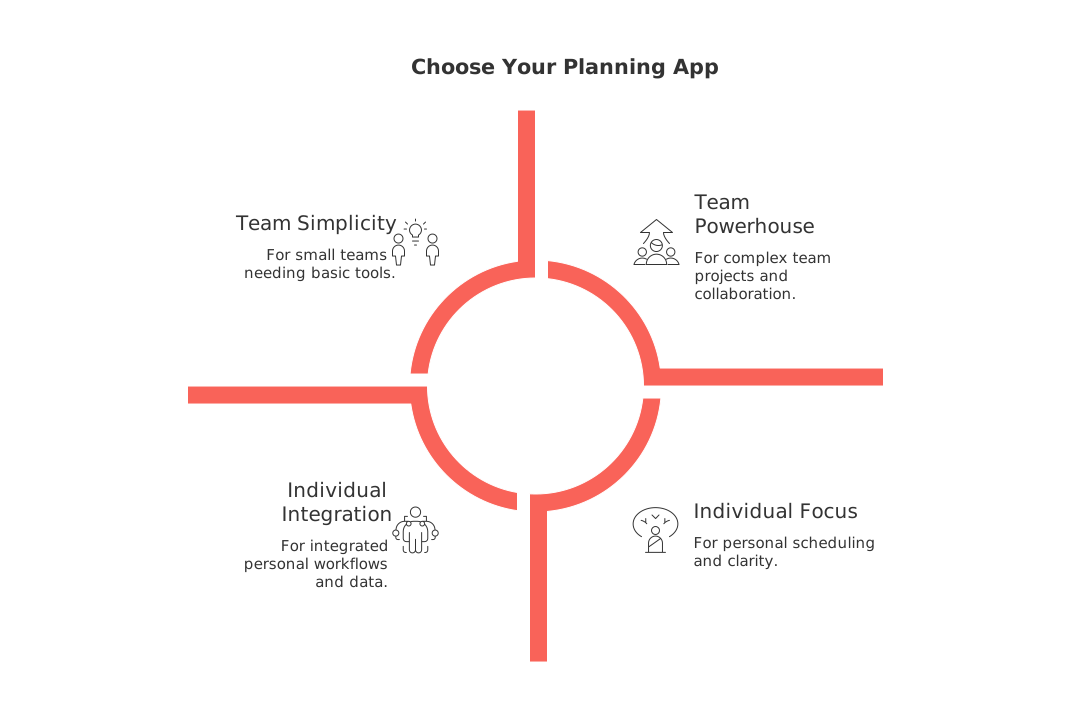
While Structured remains a strong starting point for time blocking, real‑world work is rarely that simple. If your schedule reflects larger goals, projects, or client needs, opt for a planner that delivers context as well as structure. Motion and Reclaim.ai excel for those seeking an automated, hands-off approach to scheduling. Sunsama and Todoist cater to users craving intentional personal flow and simplicity. For planners wanting their day to live inside a holistic hub of projects, contacts, and meetings, Routine is the standout choice. Ultimately, select the app that minimizes extra thinking in your week and ensures your next calendar block always fits your wider objectives.
FAQ
What is the key benefit of using Routine over other planning apps?
Routine offers integration of tasks with projects, clients, and meetings, which allows for a more connected planning experience. This is critical for professionals whose work is driven by complex project details and client interactions.
Why might Motion not be suitable for everyone?
Motion's algorithmic scheduling might leave users feeling out of control, lacking transparency in task allocations. If your work requires detailed context or flexibility, this rigid system could hinder thorough planning.
In what scenario would Sunsama be more beneficial than Routine?
Sunsama excels when personal focus and de-stressing your schedule are your top priorities. However, it might fall short in multi-project or client-based environments, where Routine's contextual power truly shines.
Is Reclaim.ai a good option for collaborative team environments?
Reclaim.ai focuses primarily on safeguarding time, which might ignore the broader context of team collaboration. For projects that require shared knowledge and integration, a tool like Routine offers better support.
What trade-offs come with choosing Akiflow?
While Akiflow is excellent for quickly managing a high volume of tasks, it lacks depth in project management and CRM capabilities. As task complexity grows, migrating to a system like Routine may become necessary.
Is Todoist enough for professional project management?
Todoist is reliable for task lists but falters when project context or collaborative features are needed. For in-depth planning and integration, Routine provides a more comprehensive solution.
How can Notion Calendar users benefit from using Routine?
Notion Calendar connects well with Notion pages but doesn’t suffice for task or CRM integration. Routine covers these gaps by bringing tasks, client interactions, and meeting details under one operational umbrella.
When should one consider moving away from an app like TickTick?
TickTick is great for simple personal planning but isn’t equipped for collaborative or client-based tasks. As professional needs evolve, transitioning to a planner like Routine, which offers more context and collaboration, is advisable.

Julien Quintard
Founder & CEO at Routine05/20/2026
