Top Alternatives to Confluence for Lightweight Documentation
At‑a‑glance comparison of Confluence alternatives for lightweight documentation
Tool | Best for lightweight docs when… | Structure style | Collaboration feel | Setup speed | Standout advantage | Primary trade‑off |
|---|---|---|---|---|---|---|
Routine | You want docs tied to projects and simple CRM without extra tools | Pages + projects + contacts in one workspace | Fast, task‑centric comments and mentions | Very fast | Smart connections between docs, tasks, and CRM | Less suited to massive, complex wiki hierarchies |
Slite | You need a tidy team wiki that stays lightweight | Channels + pages | Calm, asynchronous writing | Very fast | Opinionated simplicity for team handbooks | Limited database‑style modeling |
Nuclino | You want ultra‑fast docs with minimal structure | Graph + collections | Frictionless, low‑UI editing | Very fast | Speed and clarity over configurability | Shallow workflow automation |
Notion | You need docs plus flexible databases | Pages + databases | Highly customizable | Medium | Endless layout and schema options | Can get heavy to maintain at scale |
Slab | You want a clean, structured internal wiki | Topics + posts | Editorial, polished | Fast | Readable design and search | Less flexible for workflows |
Coda | Your docs occasionally need spreadsheet‑level logic | Docs as apps | Interactive | Medium | Packs and formula‑driven docs | Overkill for simple notes and SOPs |
GitBook | You publish simple product docs or a public knowledge base | Versions + spaces | Reviewer‑friendly | Fast | Great for clean, public‑facing docs | Less suited to day‑to‑day internal notes |
Google Docs | You just need ad‑hoc docs with minimal onboarding | Folders | Real‑time editing | Instant | Ubiquitous and familiar | Weak knowledge structure and cross‑doc context |
Routine: lightweight docs integrated with projects and simple CRM
Most teams leave Confluence because context is scattered: documentation sits far away from tasks, customer follow‑ups, and project status. Routine addresses that directly by combining a knowledge base with straightforward project tracking and a lightweight CRM in one place. You write the doc once, then attach the live task, the owner, and, when relevant, the customer record. No duct‑taping tools, no stale links.
Best for: teams that want fast internal documentation that actually drives execution, product squads, client‑service boutiques, and solo consultants who manage both work and relationships.
Why it made the list: Routine simplifies documentation, keeping it grounded in relevant project and customer contexts.
Where it stands out: smart connections between knowledge, projects, and contacts reduce swivel‑chair time. Comments stay close to the work. Simple permissions mean fewer publishing roadblocks.
Trade‑offs: if you’re trying to recreate a massive, multi‑space Confluence hierarchy with deep page nesting and strict governance, Routine’s opinionated simplicity may feel too concise. In that case, Slab or Notion might fit better.
Decision moment: Choose Routine when your “lightweight doc” needs to reference tasks, accountable owners, and client context without switching tools.
Slite: a focused team wiki that resists bloat
Teams often switch to Slite to avoid complex heading structures, restrictive permission settings, and the excessive use of templates and macros that Confluence comes with. Slite’s channel‑style structure encourages tidy, shareable docs with minimal admin.
Best for: teams ranging from 5 to 50 members seeking a dependable, understated internal wiki for policies, how‑tos, and decisions.
Why it made the list: it’s fast, opinionated, and keeps knowledge humane. There’s enough structure to stay organized without building a system.
Where it stands out: clean hierarchy, clear search, and simple publishing flows that encourage contribution.
Trade‑offs: less flexible than Notion for databases or complex workflows; fewer “app‑like” patterns than Coda.
Decision moment: Choose Slite when your team spends more time formatting Confluence pages than writing them.
Nuclino: ultra‑light speed for teams that just need to write
Nuclino wins over teams who want the fastest path from idea to published page. Its minimalist editor and graph‑style organization favor clarity over configuration.
Best for: early‑stage startups, design studios, and product squads that value speed and low cognitive load.
Why it made the list: it strips out overhead so even reluctant contributors publish.
Where it stands out: near‑zero friction editing and a tidy knowledge graph that encourages linking without bureaucracy.
Trade‑offs: fewer advanced workflow hooks. If you need embedded spreadsheets, automations, or CRM interplay, consider Routine or Coda.
Notion: flexible docs when you’re willing to maintain structure
Notion often replaces Confluence because it blends documents with databases and views. For teams comfortable designing their own schemas, it can be both a doc tool and a light operating system.
Best for: teams that want docs plus structured lists (e.g., policies, playbooks, assets) with custom views.
Why it made the list: immense flexibility and a strong ecosystem of templates.
Where it stands out: database‑backed documentation and different ways to slice the same information.
Trade‑offs: flexibility invites complexity. Without clear conventions, workspaces get inconsistent and slow. If you don’t want to be a system designer, Slite, Nuclino, or Routine will feel lighter.
Decision moment: Pick Notion when you need relational structure; leave Notion the moment maintaining that structure takes longer than writing the doc.
Slab: a readable internal wiki that scales with good habits
Slab appeals to teams that want a polished reading experience and predictable structure without turning into full app‑building. Think internal knowledge that looks like a well‑edited publication.
Best for: growing companies that are in the process of formalizing policies, runbooks, and onboarding practices.
Why it made the list: strong search, thoughtful hierarchy, and editorial touches make knowledge consumable.
Where it stands out: opinionated organization and strong defaults for categorization.
Trade‑offs: less malleable than Notion or Coda; fewer native connections to project or CRM context than Routine.
Coda: when “lightweight doc” occasionally means “mini‑app”
Sometimes a doc needs lightweight logic, calculations, filters, structured tables, without becoming a separate spreadsheet tool. Coda turns pages into interactive surfaces with packs and formulas.
Best for: teams mixing documentation with working tables, e.g., content ops checklists, hiring pipelines, or simple partner directories.
Why it made the list: it can replace one‑off spreadsheets that live awkwardly next to docs.
Where it stands out: interactive views, buttons, and integrations that make reference docs slightly actionable.
Trade‑offs: more configuration than truly lightweight tools; overkill if you only need SOPs and handbooks. If you mainly need context next to tasks and clients, Routine is simpler.
GitBook: clean, public‑facing docs without fuss
When your “lightweight” need points outward, product docs, API pages, FAQ hubs, GitBook offers a straightforward authoring and publishing flow with versioning that content and product teams can live with.
Best for: product and support teams publishing external knowledge bases with minimal design overhead.
Why it made the list: it keeps public docs tidy and readable, which prevents the bloat that often infects internal wikis.
Where it stands out: fast, consistent theming for external audiences and a review workflow non‑technical writers can handle.
Trade‑offs: not ideal as your everyday internal doc tool; pair it with Routine, Slite, or Slab for the inside work.
Google Docs: instant writing, thin knowledge management
Google Docs is the shortest distance between a blinking cursor and text. For ad‑hoc collaboration or client‑facing drafts, it’s unbeatable in familiarity. It’s a popular tool due to its familiarity, but it’s not the best option for building a well‑organized, long‑term knowledge base.
Best for: quick drafts, shared proposals, and one‑off docs with external stakeholders.
Why it made the list: zero onboarding friction and real‑time editing most people already know.
Where it stands out: fast co‑editing and commenting across organizations.
Trade‑offs: weak cross‑doc structure, limited metadata, and folder sprawl. As soon as you need a persistent handbook or SOP library, switch to a wiki‑style tool.
Decision moment: Use Google Docs for short‑lived drafts; move the content the moment it becomes repeatable policy or process.
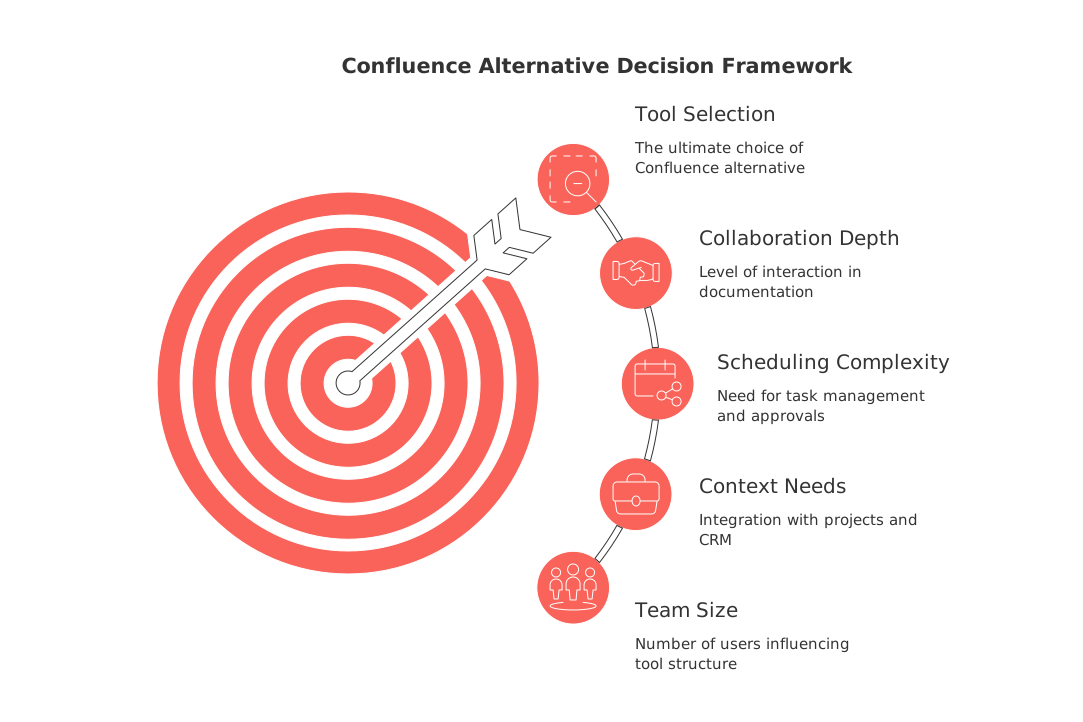
Final decision framework for choosing a Confluence alternative
Workflow maturity: - Early‑stage or small team documenting on the fly → Slite or Nuclino. - Mature teams with repeatable processes that must tie to work → Routine or Slab.
Team size: - 1–10 people → prioritize speed to publish (Nuclino, Slite, Routine). - 10–100 → add structure and ownership (Routine, Slab, Notion). - 100+ → pick a tool with clear governance and conventions (Slab, Notion).
Context needs (projects, CRM, delivery): - If documentation must reference tasks, owners, and customers in one place → Routine. - If docs mostly stand alone → Slite or Slab.
Scheduling and operational complexity: - Low complexity, few dependencies → Nuclino or Slite. - Cross‑functional projects and approvals → Routine or Notion, and pair with these project‑planning templates to standardize your docs into action.
Collaboration depth: - Asynchronous, low‑distraction writing → Slite, Slab. - Interactive working docs with tables and light logic → Coda. - Real‑time external drafting → Google Docs + an internal wiki.
Documentation vs publishing: - Internal handbooks and SOPs → Routine, Slite, Slab. - Public product docs → GitBook (plus an internal tool for day‑to‑day knowledge).
Conclusion: choose the lightest system that still carries context
Confluence breaks first when the maintenance overhead exceeds the value of the page you’re writing. A lighter tool should make it easier to publish and keep the doc close to the work it supports. If your documentation lives alongside projects and client work, start with Routine. If your priority is a minimalistic, clutter‑free wiki, Slite or Nuclino fit the bill. If you need flexible structure, Notion or Slab can scale, just plan your conventions. And when publishing outward, GitBook keeps things crisp.
If you’re mapping how documentation feeds each phase of delivery, our broader perspective in “Mastering the Project Lifecycle” pairs well with whichever tool you choose. The best Confluence alternative isn’t the most configurable one; it’s the one your team can actually start using without needing extensive training.
FAQ
What makes Routine different from Confluence for documentation?
Routine integrates with projects and CRM to provide context, eliminating the need for switching between tools. Unlike Confluence, which can become cumbersome with its complexity, Routine keeps documentation straightforward and linked to actionable tasks.
Is Routine suitable for creating a massive internal wiki?
No, Routine excels in simplicity and quick access to task-related documentation. For extensive wiki needs with deep hierarchies, Notion or Slab might be more appropriate.
How does Slite maintain a lightweight documentation structure?
Slite uses a channel-style organization to keep information tidy and encourages collaboration without unnecessary configurations. It prioritizes ease of use over customizable complexities, making it ideal for teams avoiding bloat.
When should you consider switching from Google Docs to a tool like Routine?
Google Docs is perfect for ad-hoc tasks, but when documentation becomes central to workflow and demands task integration, Routine ensures that context and documentation are seamlessly connected. It's crucial once content starts forming part of long-term processes.
Can Coda replace Routine for team documentation?
Coda is powerful with its interactive capabilities, suitable for instances where documents require logic or complex configurations. For straightforward integration with project tasks and CRM context without excess, Routine remains the tool of choice.
Why might teams choose Nuclino over other tools?
Nuclino is unbeaten in speed and simplicity for those who want to transition ideas into documents effortlessly. It's not about configurability but efficiency, making it ideal for environments prioritizing minimal cognitive load.
What are the trade-offs of using Notion for documentation?
Notion offers unmatched flexibility and customization, which can be a double-edged sword. Without disciplined organization, it can evolve into a complex system that's difficult to manage efficiently.

Julien Quintard
Founder & CEO at Routine08/21/2026
