Looking for Alternatives to Amie? Best Options in 2026
When calendar‑first planning hits a ceiling in 2026
You may have chosen Amie for its quick, user-friendly calendar and lightweight task features. However, the limitations become clear when your workflow outgrows simple dates and reminders: client details are buried in chats, project decisions reside in documents, and follow-ups get lost between meetings. At this stage, the “calendar + to‑do” model starts to struggle under the pressure of handling CRM needs, structured projects, and knowledge sharing.
This guide ranks the top Amie alternatives for 2026, based on genuine triggers for making a switch: scaling from individual to team use, streamlining the handoff from meetings to actionable tasks, protecting focus time, and bringing project and client context together. If you’re assessing the scope of various platforms, this comparison of all‑in‑one workspaces versus specialized project tools is a useful resource. Additionally, teams involved in frequent customer or internal sessions can increase efficiency with structured meeting formats and systematic recap templates, providing clear guidelines for running and documenting meetings. A third perspective to keep in mind, though we won’t go into detail here, is understanding how personal productivity apps differ from team-oriented systems, and how structured data becomes increasingly vital for efficiency and organization as your team expands.
Quick comparison of Amie alternatives in 2026
Tool | Best for switching from Amie when… | Collaboration depth | Knowledge / CRM context | Scheduling approach | Setup effort | Considerations |
|---|---|---|---|---|---|---|
Routine | You need projects, knowledge, CRM, and meetings tied together | Small teams → orgs | Native KB + CRM with smart connections | Pragmatic scheduling; context‑first | Medium | Offers broader capabilities beyond a simple calendar, which might exceed your needs if you’re managing your schedule solo |
Motion | Your days are packed and tasks must auto‑reflow around meetings | Small teams | External docs/CRM | High automation | Medium | If your work processes are straightforward, Motion’s automation may add unnecessary complexity |
Reclaim.ai | You need to protect focus and habits directly on your calendar | Solo → small teams | External | Smart time‑blocking | Low | Functions best for individual schedule defense and is lighter on project/CRM structuring |
Notion Calendar (Cron) | Your source of truth is already in Notion and you want tight scheduling | Small teams | Strong if you’ve modeled Notion well | Fast manual + linkages | Low | Scheduling is still calendar‑oriented, with more advanced project/CRM needs requiring Notion customization |
Sunsama | You want a calmer daily planning ritual with gentle accountability | Solo / small | Light; external docs | Guided planning | Low | Limited aggregation for larger teams; project and CRM depth lies outside the platform |
Akiflow | Your tasks arrive from everywhere and need quick triage + timeboxing | Solo / small | External | Manual, very fast | Low | Minimal support for shared project structures |
ClickUp | You need structured projects, docs, and cross‑team visibility | Teams / departments | Strong PM + docs; CRM via custom setups | Calendar view + priorities | Higher | Greater admin effort and a steeper learning curve due to its comprehensive features |
Routine: when meetings, projects, and CRM must live together
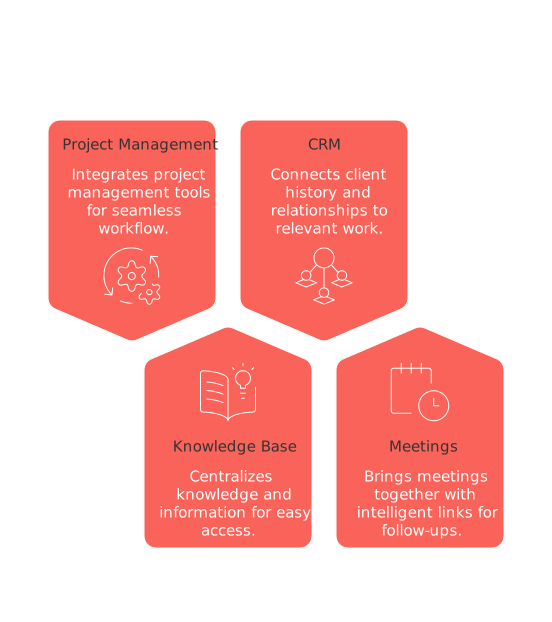
The most common reason for moving beyond a calendar‑centric app is fragmented context: tasks that depend on meeting outcomes, project knowledge, and client history become siloed. Routine brings project management, a knowledge base, CRM, and meetings together with intelligent links, so action items and follow-ups always stay connected to the relevant work and relationships.
Best for: Teams and serious solo operators needing seamless connections between projects, knowledge, customers, and meetings.
Why it made the list: Routine consolidates several tools without sacrificing depth in key areas like project structure, knowledge sharing, and CRM visibility. For those exploring platform scope, this detailed comparison of all‑in‑one workspaces and dedicated project tools can help clarify your needs.
Where it stands out: Context travels with your workflow. Prepare for a client meeting, capture key decisions, turn outcomes into tasks, and track them within the project and CRM record, all on the same platform. Recurring sessions benefit from ready-to-use meeting templates and recap frameworks, ensuring consistent processes.
Considerations: Routine offers more capabilities than a basic calendar, which may be more than necessary if you are only managing your own schedule. For a lighter touch, Notion Calendar or Reclaim could be a better fit.
Who should choose it: Agencies, product teams, consultancies, and anyone wanting fewer tools and continuity from meetings through delivery. Routine becomes essential when your task list relies on project knowledge and client context, not just dates.
When another option fits better: If schedule congestion is your main issue, Motion’s automated planning is a better initial step. For advanced project dependencies and detailed setup, ClickUp becomes a closer alternative.
Motion: for schedules that won’t sit still
If your calendar is constantly shifting, with late client calls and evolving priorities, manual planning can’t keep pace. Motion intelligently reschedules tasks around meetings, adapting as your day changes.
Best for: Individuals who need tasks to automatically move around an ever-changing calendar.
Why it made the list: It acts as a time-saving automation engine for those whose schedules are overcrowded and unpredictable.
Where it stands out: Motion excels at task-to-calendar automation, reducing the effort spent rearranging packed calendars.
Considerations: If your work processes are straightforward, the automated features may feel like added complexity. Project information, documentation, and CRM data typically reside in external tools.
Who should choose it: Sales engineers, customer success leaders, and founders managing numerous external meetings will benefit. Consider Motion if you find that you’re spending a significant amount of time reorganizing and replanning your schedule, rather than working on your actual tasks.
When another option fits better: For greater collaboration context, Routine keeps your workflow and information tightly connected. If you prefer lighter calendar defense without complex automation, try Reclaim.
Reclaim.ai: the lightest way to protect real focus
Sometimes, you don’t want a new workspace; you just need your calendar to respect focus, lunch, and recurring work blocks. Reclaim.ai acts as a smart shield for your time, automatically holding space for habits and deep work sessions.
Best for: Individuals seeking to guard their focus and routines directly via the calendar.
Why it made the list: It’s incredibly easy to adopt and brings quick, tangible benefits.
Where it stands out: Automated holds for habits and deep work, without overhauling your planning system.
Considerations: Reclaim.ai is best suited for personal calendar management and offers lighter support for project or CRM structure compared to more robust platforms.
Who should choose it: Consultants, freelancers, and independent contributors relying on Google Calendar, who simply need stronger boundaries around focused work.
When another option fits better: If you require full project coordination or rich client context, consider scaling up to Routine or ClickUp.
Notion Calendar (Cron): fast scheduling if your data lives in Notion
If Notion is your primary system of record, Notion Calendar offers streamlined scheduling tightly integrated with your existing pages and databases.
Best for: Teams that organize documentation in Notion and want scheduling tightly coupled with their data.
Why it made the list: Offers fast, polished scheduling for Notion‑centric workflows.
Where it stands out: Outstanding integration with Notion data models you’ve already built.
Considerations: Scheduling remains calendar‑oriented, and advanced project or CRM use requires deliberate Notion customization.
Who should choose it: Content, product, or operations teams that rely on Notion and want minimal disruption during adoption.
When another option fits better: For ready-made project or CRM frameworks, Routine offers less DIY setup. If you’re looking for a more mindful personal workflow, Sunsama could be a calmer fit.
Sunsama: a calmer daily cadence for focused work
When the goal is to be intentional, focus on finishing work, and maintain healthy planning habits, Sunsama’s guided rituals help you structure and reflect on your day.
Best for: Individuals and small teams seeking discipline without the complexity of automation.
Why it made the list: Sunsama sustains a repeatable loop: review, plan, commit, reflect.
Where it stands out: Offers gentle guidance that protects focus and supports realistic expectations about daily output.
Considerations: Limited in its roll-up capabilities for multiple teams; deeper project or CRM tracking requires supplementary tools.
Who should choose it: Early-stage founders or creators balancing client work, content delivery, and administration.
When another option fits better: For comprehensive team structure and customer context, Routine or ClickUp are more robust foundations.
Akiflow: the fastest triage when tasks come from everywhere
When tasks are flooding in from Slack, email, and tickets, Akiflow is designed for rapid capture, triage, and time blocking, turning your chaotic inbox into an actionable schedule.
Best for: Individuals needing keyboard-driven speed across numerous input channels.
Why it made the list: Drastically reduces the friction of deciding where new tasks belong.
Where it stands out: Command palette triage and immediate scheduling for fragmented inputs.
Considerations: Light collaboration model with limited support for shared project or CRM context.
Who should choose it: Freelancers and independent contributors who prioritize personal speed and control over shared structure.
When another option fits better: For teams needing client visibility and narrative continuity from meetings to tasks to CRM, Routine provides a cohesive solution.
ClickUp: structure and scale when ad‑hoc lists stop working
Some teams outgrow calendar‑oriented tools not because of schedule overload, but because they need structured processes. ClickUp delivers project and task management, documentation, and multiple views for teams that require clear statuses, role assignments, and transparency.
Best for: Teams managing projects over weeks or months, with defined ownership and dependencies.
Why it made the list: Offers sophisticated project structuring and flexible ways to organize work.
Where it stands out: Provides customizable workspaces, documentation, and reporting for teams desiring process and transparency.
Considerations: Involves more administration and a steeper learning curve than simpler planning tools, but enables deep organization.
Who should choose it: Growing product, marketing, or operations teams formalizing workflows. Consider shifting to ClickUp if your team often struggles with blocked tasks, unclear task delegation, and due date confusion, a structured tool like ClickUp can enhance visibility and clarify responsibilities.
When another option fits better: For a more consolidated approach with integrated CRM and meeting context, Routine brings more elements into one platform.
Decision framework: choose the right Amie alternative based on workflow maturity, team size, and context needs
Workflow maturity Early/individual: Reclaim or Sunsama keep things simple and sustainable.
Growing team with process: Routine or ClickUp provide structure beyond basic scheduling.
Team size Solo/freelancer: Akiflow for speedy triage, Reclaim for defending your calendar.
Small team (2–25): Routine when you need integrated projects, knowledge, and CRM; Motion if scheduling volatility is your main pain point.
Departments: ClickUp for robust project management; Routine for broader needs with CRM and meeting connection.
Conclusion: pick the tool that matches your next stage, not just your next week
Amie works well until your work requires richer structure and context. For keeping projects, knowledge, CRM, and meetings coordinated, Routine is a strong contender, especially compared with Motion’s automation-first approach or ClickUp’s comprehensive project stack. If your priority is a calmer daily pace or focused time, Sunsama and Reclaim are more gentle, streamlined options. Ultimately, choose based on how your team operates now and how you expect to collaborate in the months ahead, not just for aesthetic appeal or convenience in the short term.
FAQ
Why might Amie no longer suit my team’s needs by 2026?
Amie is great for calendars and simple tasks but falters with complex workflows involving CRM, knowledge sharing, and project structure. As teams grow, the limitations of a calendar-first approach become glaringly apparent.
How does Routine differentiate itself from other Amie alternatives?
Routine integrates project management, CRM, and meetings in one platform, ensuring information isn’t siloed. This cohesion is key for teams needing to link tasks with strategic outcomes, unlike solutions that keep these elements separate.
When is Motion a better fit for my business compared to Routine?
If your main struggle is managing an unpredictable schedule, Motion’s auto-reflowing tasks outperform Routine. However, it lacks the integrated project and CRM structures that Routine excels in.
Can Sunsama handle team-level project planning?
Sunsama excels at individual planning with an emphasis on reflection and intent, but it lacks the depth for aggregating projects across teams. It's a misfit if your team depends heavily on shared project structures.
What should I consider before choosing ClickUp over Routine?
ClickUp offers comprehensive project management and documentation that’s ideal for intricate workflows. However, it demands more setup and a steeper learning curve compared to Routine's integrated approach.
Is Akiflow suitable for collaborative work environments?
Akiflow prioritizes individual speed and control, not collaborative frameworks. It’s practical for freelancers or those not requiring robust shared systems.
Who benefits most from using Notion Calendar over other tools?
If your team already operates within Notion, Notion Calendar is a seamless fit for scheduling. Yet, for deeper project or CRM needs, expect to heavily customize Notion or look elsewhere like Routine.
Why should independent contributors consider Reclaim.ai?
Reclaim.ai helps safeguard focused work time by securing calendar blocks. It's lightweight and ideal for those not needing expansive project management tools.
When is transitioning to Routine a strategic move for my team?
If project outcomes, meetings, and client data need coordination on one platform, Routine facilitates cross-functional continuity. It’s essential when such cohesion becomes critical rather than just convenient.

Julien Quintard
Founder & CEO at Routine05/12/2026
